AI photo calories New
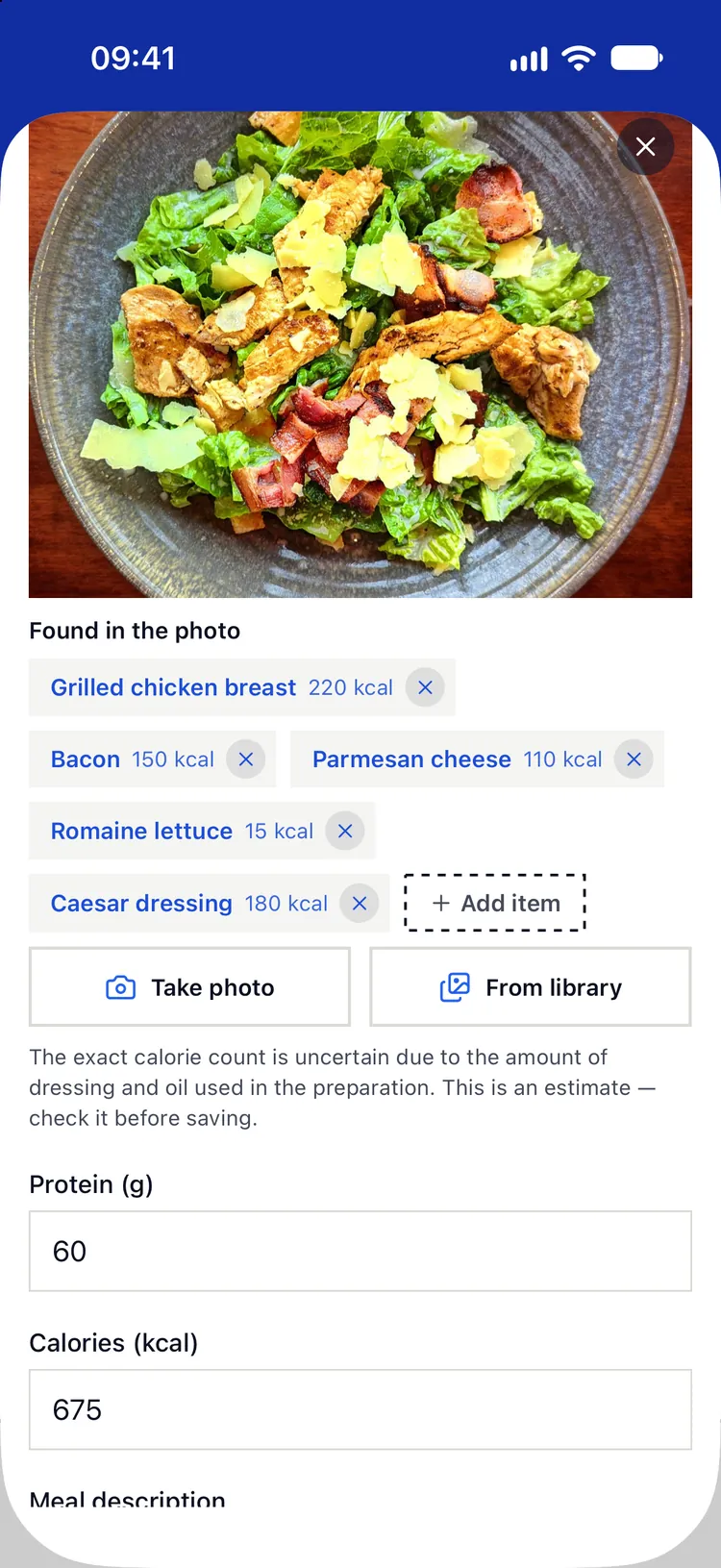
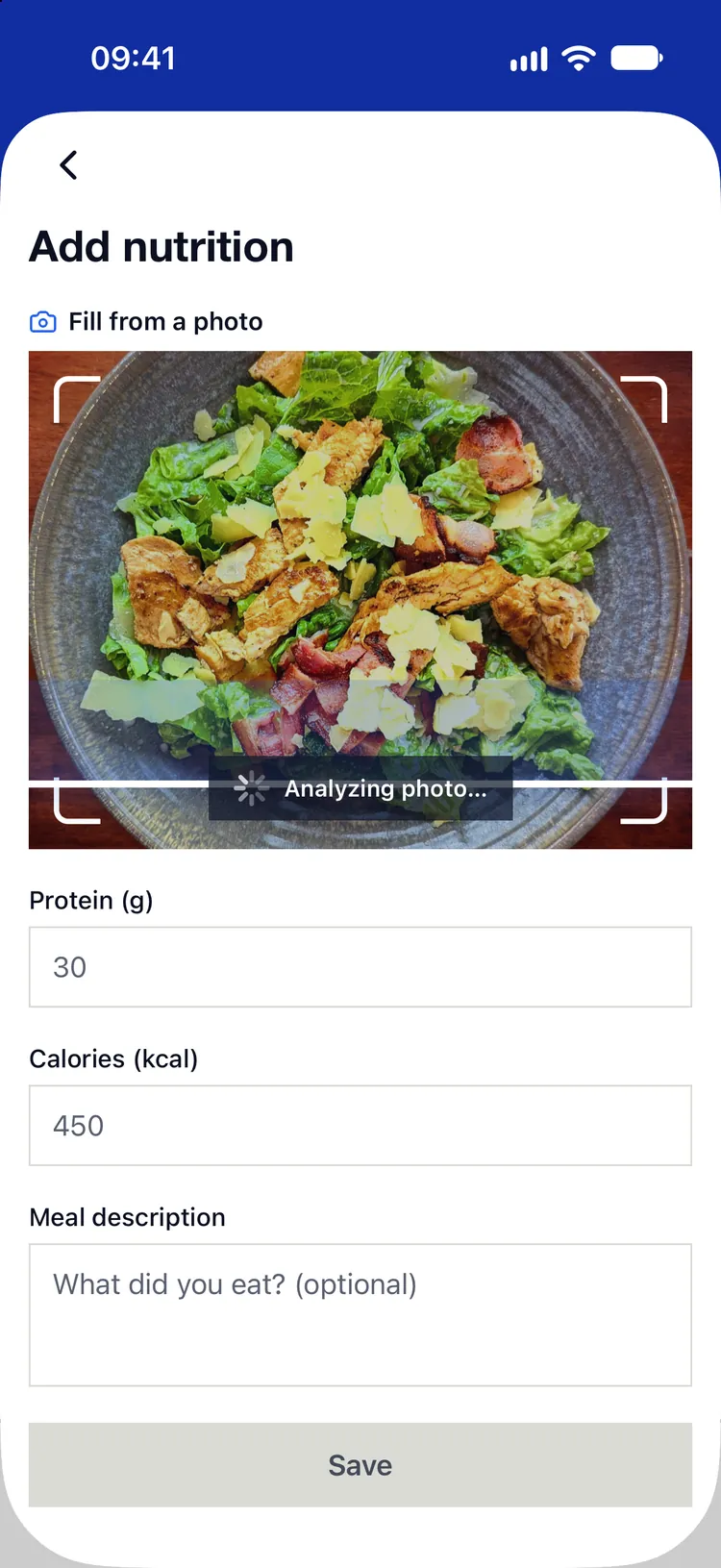
Snap your meal and get calorie and protein estimates from the photo, in your language. Always shown as an editable draft — you stay in charge. First photo free, then Premium. How AI calories work
Log every shot or daily pill, snap a meal and get calories and protein from a photo, and watch your weight next to an estimated curve of your medication. Make it yours with a mascot and a colour theme. Dose logging and reminders are free, with no time limit. Already tracking somewhere else? Bring your history with you.
For Ozempic® · Wegovy® pen & pill · Mounjaro® · Zepbound®
Three steps. No setup headache.
Pick a weekly or daily injection — Ozempic®, Wegovy®, Mounjaro®, Zepbound®, Trulicity®, Saxenda®, Victoza® — or a daily tablet: Wegovy® pill, Ozempic® tablet, Rybelsus® or Foundayo™. Set your dose and schedule.
Tap to record the dose, time, and injection site on a body diagram. Smart rotation suggests your next site.
Export a PDF report with up to the last 180 days of treatment history, weight progress, and side-effect log: perfect for your next visit.
No account, no in-app ads, no profile. Your injections, weight and measurements are stored on your device. Delete the app and the records on this phone go with it. Files you exported, anything you wrote to Apple Health and your own iPhone backups are separate.
Download on the App Store Read the Privacy Policy →On a GLP-1 you eat less, so what you do eat matters more. Take a photo and Dozify lists each item on the plate with an estimate of its calories and protein, in your language. It is always an editable draft: fix a portion, add what the camera missed, then save it next to your doses and weight. Your first photo is free; after that it is Premium, with a 14-day free trial on the yearly plan (7 days on monthly).
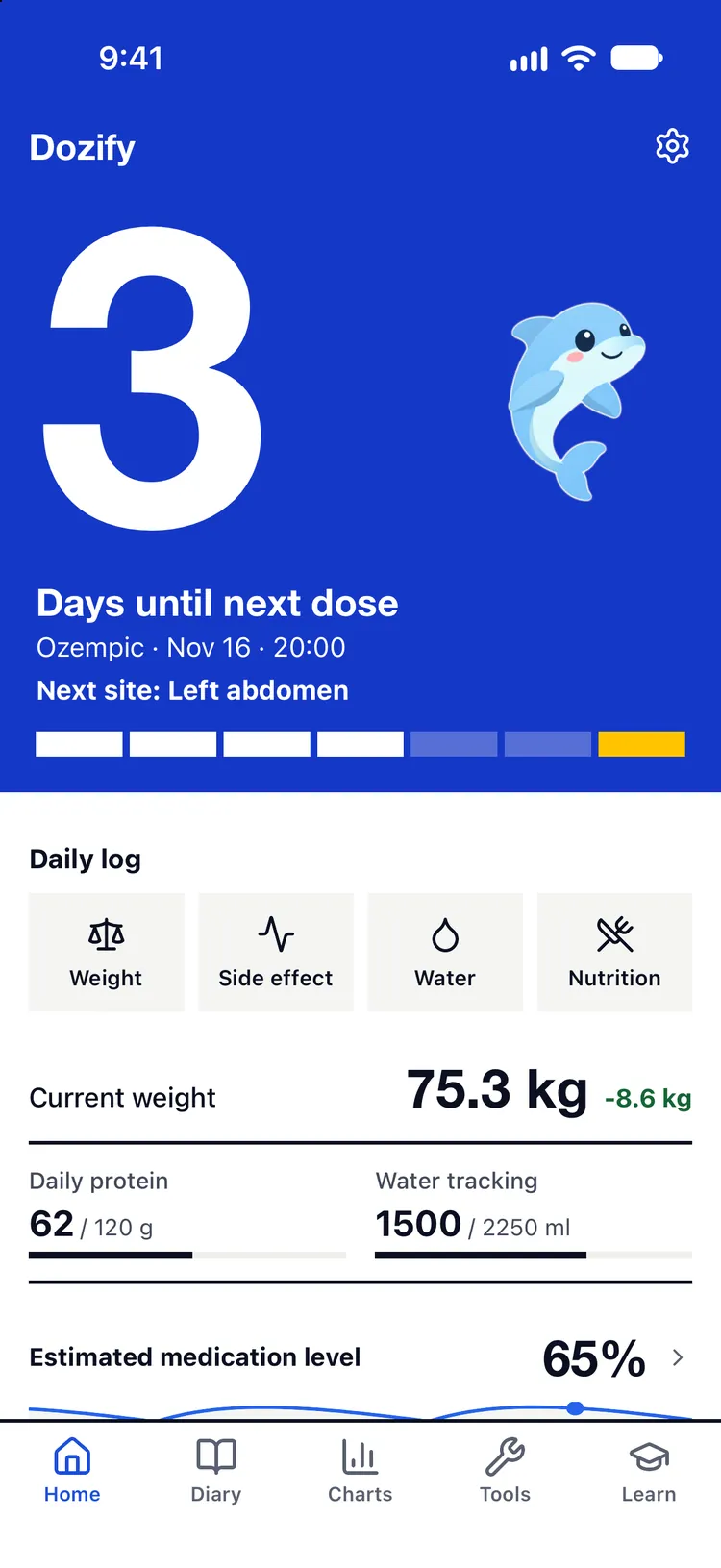
A quick look at what you'll see on your phone.


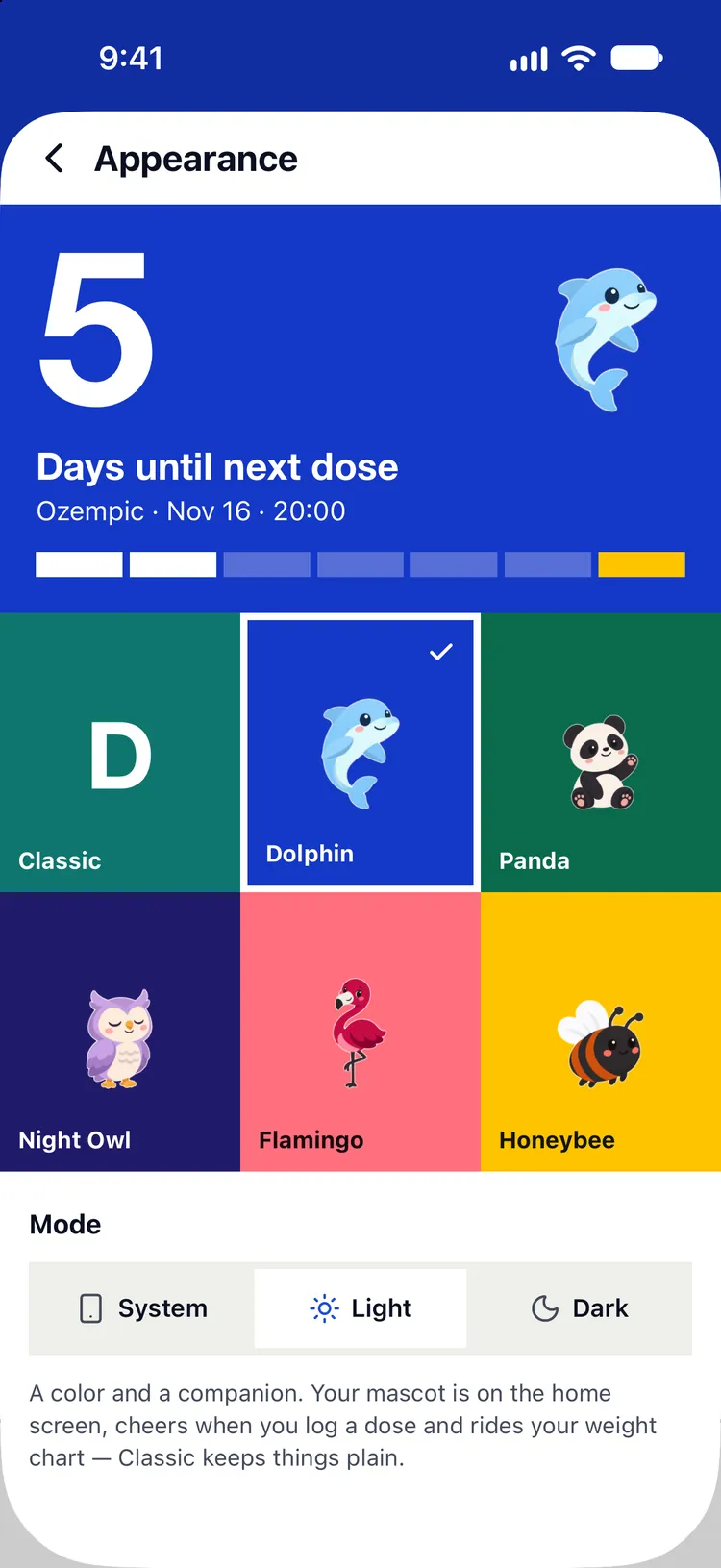
Six themes: Classic has none, the other five each bring a drawn companion (Dolphin, Panda, Night Owl, Flamingo and Honeybee). The colour runs through every screen, the mascot greets you on the home screen, cheers every dose you log and rides your weight chart, and the app icon on your home screen changes with it. Classic keeps things plain.
Dolphin is free. Panda, Night Owl, Flamingo and Honeybee come with Premium. Light, dark or follow the system — your choice.
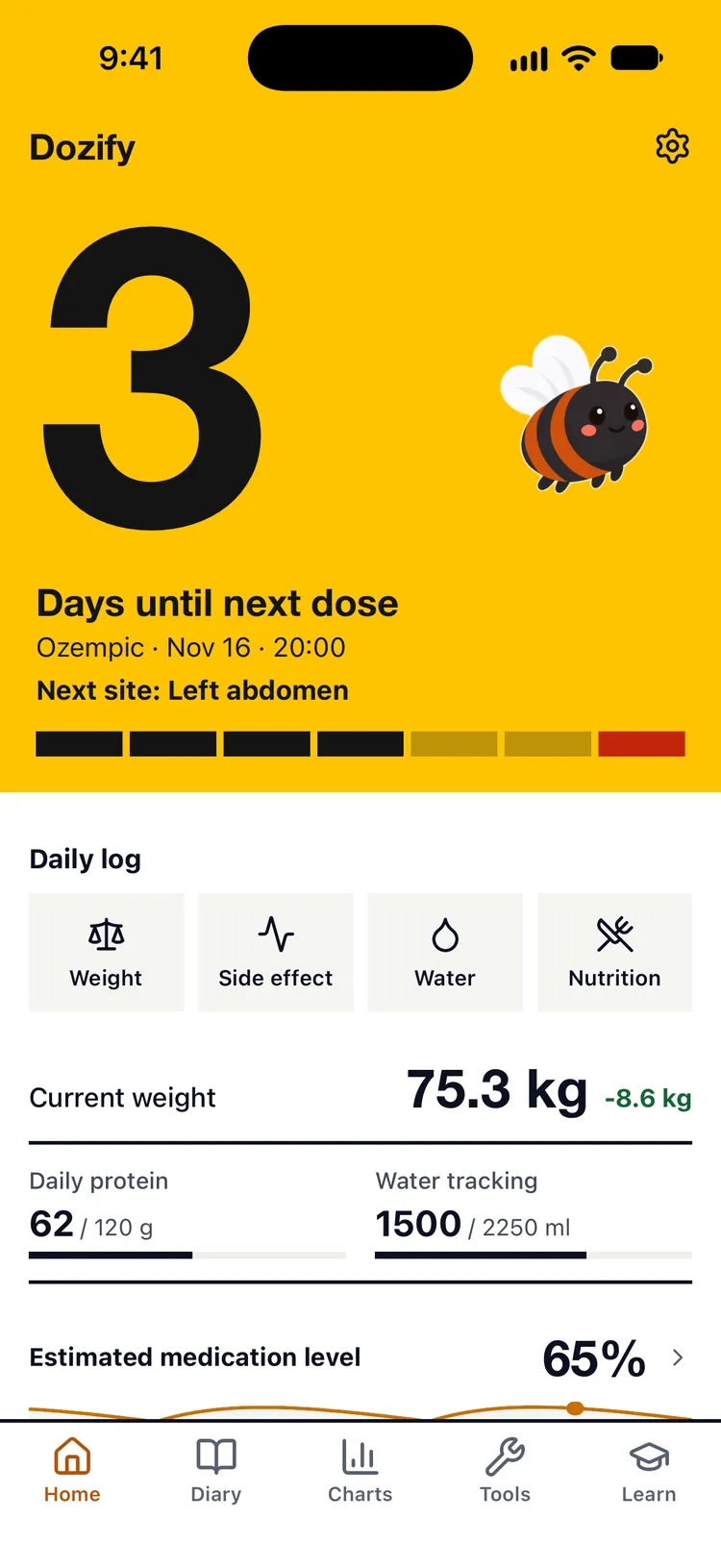
Designed for people on weekly GLP-1 medications.
Part of Premium: the medication-level curve, the doctor PDF, cycle alignment, weight projection, vial stock, progress charts and body measurements. Dose logging and reminders stay free.
Snap your meal and get calorie and protein estimates from the photo, in your language. Always shown as an editable draft — you stay in charge. First photo free, then Premium. How AI calories work
Start with your weight; your first meal photo is free. Add a medication whenever you begin one.
Before you decide, locked screens show what Premium adds using your own entries, such as your estimated medication level. Drawn on your device; nothing is sent.
An estimated curve of how your dose builds up and fades between shots, to set beside how your week felt. About the curve
Color, mascot and even the app icon change together. Dolphin is free; panda, owl, flamingo and bee come with Premium.
Progress the scale can't see: clothes that fit, stairs that got easier. Free, on purpose — for the plateau weeks.
HbA1c, lipids, liver values — stored exactly as you enter them and included in the doctor PDF. No verdicts, no color grades.
See your symptoms aligned to your menstrual cycle — only if you turn it on, and the data is used on your device only.
See your weight on clear charts with a time-to-goal projection based on your own data.
Weekly or daily reminders that match your medication's schedule. Each injection reminder names your next site, and you can log the dose right from the notification.
Open dates, expiry countdown, and remaining doses for every vial.
Weight trend, dose escalation, and side-effect patterns at a glance.
A few taps build a doctor-ready summary covering up to the last 180 days. The summary PDF is free twice a month; the doctor-visit report is Premium.
Turn on Apple Health in Settings and Dozify reads your latest weight each time you open the app (writing back is off by default and asks for its own permission).
Unit conversion (mg ↔ mL ↔ U-100) and vial-duration estimates, free.
Moving from another tracker? Dozify reads your exported file, shows you what it found, and writes it only once you approve: with a backup taken first.
Reorder cards, hide the ones you do not use, bring them back whenever you like. If you do not track side effects, the check-in card stays off your home screen.
Weekly, daily or every few days. Save the dose schedule your clinician gave you and let the app remind you. Dozify never picks a dose itself.
Guides on dosing, side effects, and injection technique, with sources listed.
A body diagram tracks each site and suggests where to inject next. Your next site also shows on the home screen.
Track waist, hip, body-fat and more: the progress the scale alone misses.
Milestones (Premium): your progress and active-day streak.
Log water right alongside your treatment; meals and protein are part of Premium.
Built to read exports from Shotsy, GLPzy and GlucoPal, from their published formats, and any CSV with a date column and a weight, dose or symptom column. If you can get a CSV of your Glapp data, Dozify can read it. Not every format has been tested with a real export; the preview shows what was read before anything is written: how many injections, weights and side effects. A backup of your existing data is taken first, and importing costs nothing.
How switching works →
Pick the one you were prescribed and Dozify sets up its usual schedule and lists its strengths. Anything not on the list you can add by hand.
Ozempic®, Wegovy®, Mounjaro®, Zepbound® and Trulicity®: one shot a week, and one reminder a week to match.
Saxenda® and Victoza® — a daily schedule, at the hour you actually inject rather than a default.
Wegovy® pill, Ozempic® tablet, Rybelsus® and Foundayo™ — daily tablets, tracked with the same history and the same report. How pill tracking works
Add a medication by name with your own dose and interval. Dozify records the plan you and your doctor agreed on; it never proposes one.
A visit is ten minutes and three months. Pick the date range and what goes in it (doses, weight, side effects, your own notes and the questions you meant to ask) and Dozify builds a PDF you can print or send ahead. What it contains is your record; what it means is your doctor's call. The summary PDF is free twice a month; the doctor-visit report is Premium.
What the report contains →Written for people already on a GLP-1, each one citing where the information came from: the manufacturer instructions, the FDA, MedlinePlus. None of it replaces what your own clinician tells you.
The hormone your gut releases after eating, what the medications copy, and why appetite changes.
Preparing the pen, choosing a site, the injection itself, and what to do with the needle afterwards.
Abdomen, thigh and upper arm are the approved sites. Which to choose and why the spot must move.
Nausea, constipation and fatigue: what tends to help, and the signs that need a doctor now.
No patch is approved by the FDA or EMA. What is sold under that name, and what the evidence says.
Five days for one product, two for another of the same medicine. What each leaflet says, quoted.
Fridge, counter, and the day count, which depends on the device, not only the medicine.
The full library, with the reference list at the bottom of every page.
Yes. Dose logging and dose reminders are free, with no time limit. Also free: one active medication, site rotation, weight, water and side-effect logging, lab values, victories, check-ins, your full history, the summary PDF (2 a month), Classic and Dolphin themes, the 26 guides and your first AI meal-photo analysis. Premium: AI meal-photo analyses after the first one, a second (and further) active medication, the estimated medication level curve, all trend charts and the side-effect timing view, weight trend and time-to-goal projection, body measurements and composition, nutrition tracking, your doctor's dose plan, milestones and streaks, weekly summary, appointment mode, dose-change notes, four more themes, the smart water reminder, advanced reminders (refill, vial expiry, dose step-up day), detailed and doctor PDF reports, vial management, and adding new progress photos. Subscription and cancellation details are on the support page.
Your health records (doses, weight, side effects, progress photos) are stored on your device and never uploaded. The one exception is a meal photo you choose to analyse with AI calories: it is sent, after you agree, through our server to Google Gemini and is not stored by the app. There is no account and no cloud sync, and the app shows no advertising. Usage statistics tied to a random app ID, not your name. They record that a feature was used, never a medication, dose, weight or symptom. Dozify also measures whether an install came from one of its own App Store or Meta campaigns; that measurement runs behind Apple's tracking permission and never includes your health records. Delete the app and the records on this phone go with it. Files you exported, anything you wrote to Apple Health and your own iPhone backups are separate.
Dozify helps you track popular GLP-1 medications, including Ozempic®, Wegovy®, Mounjaro®, Zepbound®, Saxenda®, Trulicity®, and Victoza®, plus daily tablets: the Wegovy® pill, Ozempic® tablet, Rybelsus® and Foundayo™. These brand names are trademarks of their respective owners, and Dozify is not affiliated with these companies.
Yes for tracking and reminders. AI meal photos and buying Premium need a connection. You never need to sign in or sync to use it.
Yes. You can set a weekly or daily reminder that matches your medication's schedule, so it is easier to stay consistent with your routine.
No. Dozify is an educational tracking tool, not a medical device, and it does not provide medical advice. Always follow your doctor and your prescription — what the app refuses to do is written out in full.
Yes. You can record your weight and a side-effect diary for free. Body measurements, trend charts, a weight projection and a time-to-goal estimate based on your own data are part of Premium.
Yes, and it is free. If the app you are leaving offers an export, export from it, open Settings → Import in Dozify and pick the file. It is built to read Shotsy, GLPzy and GlucoPal exports from their published formats, and any CSV with a date column and a weight, dose or symptom column; if you can get a CSV of your Glapp data, Dozify can read it. Not every format has been tested with a real export. It shows you what it found (how many injections, weights and side effects) before writing anything, skips records you already have, and backs up your existing data first. More on the switching page.
Not yet. Dozify is iPhone only for now, on the App Store.